BIM BOTbeta

Instant Panic Log Analysis via WhatsApp

The BIM WhatsApp Bot allows you to analyze iPhone panic logs directly from your phone. Simply send a log or image, and receive a structured diagnostic response within seconds — no need to open the web app. While the service is in Beta, it is available free of charge for all users.

How It Works

  • Send a panic log (text) or upload a screenshot.
  • The bot extracts and analyzes the panic data.
  • Lookup mode: Used for identifying the faulty component based on a panic code (e.g. mic2, 0x000001). You can send just the panic code if you already know it. The response includes all known device models and their related faulty components for that error.
  • Results are typically returned within ~30 seconds, depending on input quality.
  • You receive a structured report including:
    • 📱 Detected iPhone model
    • 🚫 Panic error code
    • 👉 Likely faulty component (Multilingual support)
    • 📋 Repair notes

How to Use

1. Open WhatsApp

2. Start a chat with the BIM Bot

3. Send one of the following:

  • Full panic log text
  • Screenshot of panic log
  • Short panic code (for quick lookup)

4. Wait a few seconds for analysis

Example Log Input

panic(cpu 0 caller 0xfffffff...): userspace watchdog timeout: no successful checkins from thermalmonitord service returned not alive with context : is_alive_func returned unhealthy

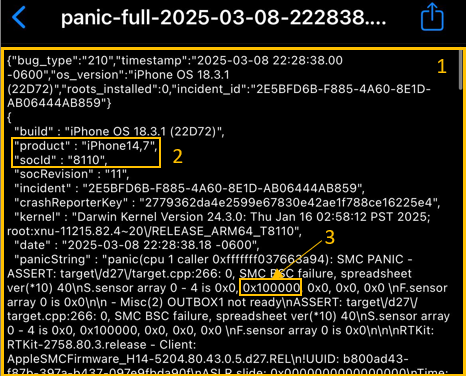
Log Screenshot Example

Panic log example
  • A clear image without reflections is recommended for optimal analysis accuracy.
  • The best results come from sending the log starting from the very first line.
  • Product and SoC ID help identify the exact device model.
  • panic error example

Notes

  • Short messages trigger quick lookup mode.
  • Full logs or images trigger deep analysis.
  • Processing time may vary depending on image clarity.
  • For best results, include the panicString section.

Fast diagnostics. Minimal input. Built for technicians.

ad